
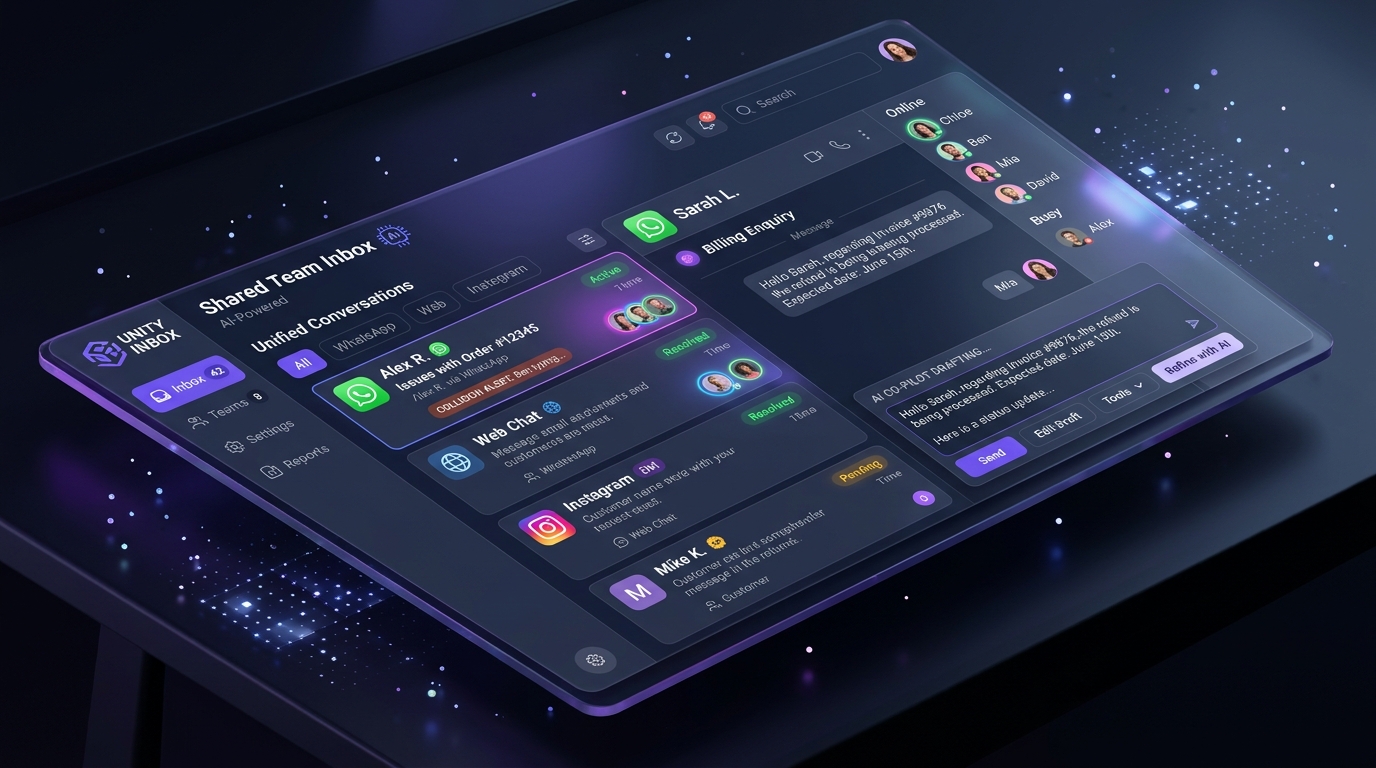
What is a shared team inbox for customer support?
A shared team inbox is a centralized collaborative workspace where multiple support agents, sales reps, and managers manage customer conversations from WhatsApp Business, Website Chat, Instagram Direct, and Telegram in one single place. Powered by an AI customer support platform like Thunaivi, a shared team inbox provides real-time collision detection, private internal notes, automated conversation assignment, and sub-second AI reply drafting—eliminating duplicate answers and preventing lost customer inquiries.
If your team handles customer support across separate browser tabs—one for WhatsApp Web, another for Instagram DMs, another for your website live chat, and an email helpdesk—you already know the chaos that follows. Customers wait hours for a reply, two agents inadvertently send contradicting responses to the same person, and critical high-value sales inquiries slip through the cracks during busy hours.
In 2026, forward-thinking businesses cannot afford fragmented communication. Customer satisfaction hinges on instantaneous, cohesive communication. Adopting an AI-powered shared team inbox transforms chaotic customer interactions into a streamlined, high-velocity growth engine.
Experience the AI Shared Team Inbox Live
Unify WhatsApp Business, Website Chat, and Instagram into one collaborative workspace. Stop agent collision and resolve queries in seconds.
1. The 4 Hidden Costs of Managing Multi-Channel Inboxes Manually
When customer messages are scattered across disconnected apps and physical devices, your operations suffer from systemic vulnerabilities:
- Agent Collision & Contradictory Replies: Without real-time typing indicators and locks, two agents frequently respond to the same WhatsApp or web inquiry simultaneously, confusing the customer and wasting team resources.
- Lost Customer Context: When a user starts on your website chat and later follows up via WhatsApp, disconnected inboxes treat them as a brand-new stranger. Forcing customers to repeat their order number or issue destroys brand trust.
- Slow Response Times & Missed Leads: During promotional campaigns or product launches, inquiry spikes overwhelm individual phone numbers, leaving hot leads unaddressed until they buy from competitors.
- Zero Accountability & Performance Visibility: When agents use personal phones or generic login credentials, team leaders have no clear visibility into individual response times, resolution rates, or customer sentiment.
2. Core Capabilities of an AI-Powered Shared Team Inbox
A modern collaborative inbox does far more than just consolidate messages; it orchestrates your entire support operation with AI intelligence:
A. Unified Omnichannel Aggregation
Bring conversations from WhatsApp Business API, Instagram Direct, Telegram, and Website Live Chat into a clean, searchable dashboard. Every team member has access to the full conversation history, previous orders, and customer tags regardless of the channel used.
B. Real-Time Collision Detection
Visual status indicators show exactly who is viewing or replying to a conversation in real time. If Agent Sarah opens a billing dispute, other team members see a clear lock badge: “Sarah is currently replying…”. This eliminates duplicate messages and conflicting resolutions.
C. Private Internal Notes & Team Collaboration
Need input from your technical lead or warehouse manager before answering a complex question? Agents can leave private internal notes right inside the chat thread using @mentions. The customer never sees internal discussions, ensuring seamless handoffs and swift resolutions.
D. Sub-Second AI Co-Pilot & Auto-Drafting
Powered by Retrieval-Augmented Generation (RAG) strictly grounded in your verified product catalog, documentation, and policies, Thunaivi automatically drafts accurate replies in 0.65 seconds. Human agents can review, refine, or approve suggestions with a single click, cutting response times by over 70%.
E. Seamless 1-Click Human Takeover
While the AI autonomously handles 80% of routine FAQs (pricing, business hours, order tracking), human operators can jump into any live thread instantly. The AI politely yields control, maintaining uninterrupted customer continuity.
3. Comparison: Traditional Shared Mailbox vs. Thunaivi AI Shared Inbox
4. How Indian & Global Growing Businesses Leverage Shared Inboxes
Modern businesses across varied sectors achieve measurable operational savings and revenue growth through centralized inbox management:
- D2C & E-Commerce Brands: Handle high-volume order tracking inquiries, cancellations, and return requests across WhatsApp and website live chat without hiring extra seasonal support staff.
- Healthcare & Clinics: Centralize appointment booking, operating hours inquiries, and patient triage across digital channels while maintaining strict data privacy.
- Real Estate & High-Ticket Services: Instantly capture high-intent inquiries from property portals, qualify buyer budgets via AI, and route pre-qualified leads directly to the on-duty sales rep.
- Digital Agencies & SaaS Resellers: Deploy white-label customer support inboxes for client brands under custom agency subdomains (
support.agencyname.com).
5. How to Deploy Your Team’s Shared Inbox in 3 Steps
- Connect Your Communication Channels: Link your official WhatsApp Business number, embed the 35KB lightweight website widget, and connect Instagram and Telegram accounts in under two minutes.
- Train the Knowledge Base: Upload your company FAQ documents, product catalog PDFs, or website URLs. Thunaivi’s semantic engine indexes your policies with zero manual rule coding.
- Invite Your Support Agents: Assign role-based permissions (Admin, Agent, Viewer) and define routing rules by department or language.
Curious how much your organization will save in agent labor and reduced SLA times? Check out our interactive Customer Support ROI Calculator to calculate your projected return on investment.
Frequently Asked Questions
Can multiple agents use the same WhatsApp Business number?
Yes. By connecting through the official WhatsApp Business API, your entire customer support team can send and receive messages simultaneously from one verified business phone number without logging each other out.
How does collision detection prevent duplicate replies?
When an agent opens an active customer conversation, Thunaivi displays a real-time presence avatar and locks typing access for other agents, accompanied by a status badge indicating who is currently handling the inquiry.
Does the AI replace human customer support agents?
No. Thunaivi acts as an intelligent co-pilot. It automatically answers repetitive tier-1 inquiries (like order status, operating hours, and basic product details) and drafts suggested responses for complex questions, allowing your human agents to focus on high-touch sales and empathetic relationship building.
Can we leave internal notes that customers cannot see?
Yes. Agents can post yellow-highlighted internal notes directly in the conversation timeline and mention specific teammates with @username. These notes remain strictly internal and are never visible to the customer.
Experience the AI Shared Team Inbox Live
Unify WhatsApp Business, Website Chat, and Instagram into one collaborative workspace. Stop agent collision and resolve queries in seconds.